Showing posts with label Google. Show all posts

Sunday, 25 August 2013

How to search on Google (Very useful)

Among all the search engines Google is the fastest and most used search engine of modern era  , Now in this article I'm not going to explain why google is the fastest or how search engines work but i this article  I'm going to explain the different techniques to search on google probably 98% people don't know how to search on google.
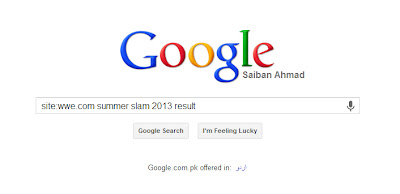
Following are some of the techniques used to search on google like a pro.

1)Search in a specific website: 
We can use google to search in any specific website now for that go to google and type
Site:SiteName.com <Space> <The word or phrase we want to search> and hit enter.
the key in this search is Site: which will search all the pages of SiteName.com for the word or the phrase we want to search.
 
Now in the above picture we are searching the website WWE.COM for the phrase (Summer Slam 2013 Result)


2)Search for similar words:
Sometimes you really don't know anything about what you are looking for and you only have only one or two keywords and your search depends upon them.
In that situation your sole purpose is to use those keywords and find what you want but its very difficult to search using one keyword for that you can use " ~ " add ~ before the word and click search , Google will not only search the word after ~ but also the words similar/related to the word written after ~.
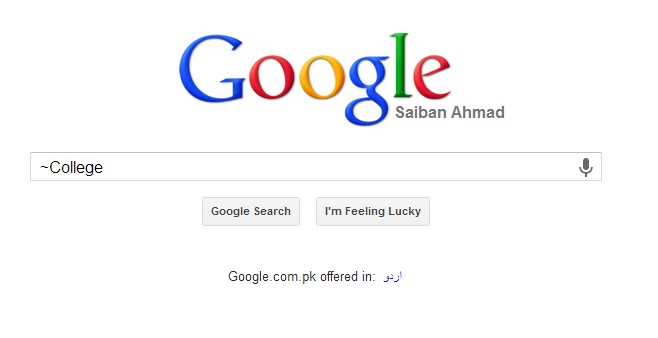
In this search google will also search for related words such as "Higher Education" , "Universities" , "Test Papers" , "Result" etc...

3)Exclude terms or a word from the phrase:
Certainly we are not searching for every word that is present in our search , There are some extra words that we use to explain google about the result we want or sometimes to complete the sentence.
To exclude any term from the search result we add minus sign before the word we want to exclude.
In this search result google will exclude two words payper and view because they have - sign before them. 

4) Search For Exact Same Phrase or Term:
Most of the time it is very very important for us to find the exact phrase we are searching for.
for that we will use " " and type our phrase/sentence inside " " and google will search for the exact same sentence/phrase.
For instance we are searching for a song and we only know one sentence of the song or two to three words in a sequence so we use this technique to search for our song.
Now google will search for the exact same words and hopefully we will get what we want in no time. 

5)Search within the desired time range:
This is very exciting and my favourite technique to search anything within the specific time range.
suppose we are looking for the test papers of "Federal Board" from 2006 - 2013
so we add two dots (..) between the time range.


[Continue Reading]

Sunday, 18 August 2013

How To Increase Backlinks Of Your Blog


What are Backlinks?

Incoming links to your blog/site are known as backlinks. Or those links by which the visitor can land from one site to another site are known as backlinks.

Why You Should Build The Backlinks? - Importance

This is the important that you should build the backlinks of your blog because it is most important thing which can help us in many places. After link building, many sites will be linked to your blog and by this you will be getting from that site. It helps in improving the Alexa (How to Boost Alexa Rank Within Days Using Online Tool) and Google Page Rank that is the need of every blogger and it also help you in improving the visibility of your blog in search results that will help you in getting organic traffic.

Below I've discussed some great methods to build the backlinks for your blog. So go and grab this now.


1# Guest Posting

This is one of the best method to link building. You should be a guest blogger and guest blogger submits some posts on some popular blogs and he gets the backlink to his blog in that post with the guest blogger bio. That link is usually dofollow and it helps a lot because dofollow has more value then nofollow. I'll publish another post for those who don't know about dofollow and nofollow.

2# Blog Commenting

This is another tip that blog commenting can also increase backlinks for you. But comment on those blogs which are using CommentLuv or KeywordLuv commenting system because in that system we can easily add the recent post link of our blog. And also comment on WordPress blogs because in those blog we can only add the homepage link of our blog but it is also good. Don't comment like a robot, I mean do not spam in comments and post the different comment according to the post because comment spamming can harm your blog in the next Google Penguin update.

3# Unique and Most Loved Content

Content is another thing that can also help you in building the backlinks of your blog. You should publish the unique content and most loved by your visitors. Ask your readers what they want and give them. Now if that content is loved by your readers then they will also share this with their friends and that is what it is gonna help you. e-Boos and resources are the best thing that your visitors will like to get and share it with their friends.

4# Social Media Promotion
Importance of  social media for new blogs and websites
I think you know that almost every internet user is on Social Media sites like Facebook. So this is the great opportunity to take benefit from it. Share your content or posts on some popular social sites and also join the communities related to your niche on those sites and share your content on those communities. This will help you in building backlinks and also in increasing traffic.

5# Forum Posting

Forum posting is also a great idea in increasing backlinks and traffic of your blog. In this method, You've to join some forums which must be related to your blog after joining the form, you've to publish some threads or reply to the threads. And before publishing or reply to threads make sure that you've added your blog's link in the signature.

6# Directory Submission

There are some web directories on the internet where you will need to submit your blog along with the details. After that, those directories will list your blog in the most appropriate category and it will take to get approval or listing your blog. Submit your blog to the most popular directories like Dmoz.org. This will help you in increasing traffic and also in backlinks.


[Continue Reading]

Saturday, 17 August 2013

Importance of Social Media for New Blogs and Websites

As we all know that it is very irritating and disturbing to get few visitors to our blogs even old blogs and websites. Even after few months and good number of posts we are not so sure about getting web traffic from Search Engines and same situation with Google Search Engine which is most preferable way to get traffic. Because it takes some time for Google to index all the pages and compare it with good content which is already on Google, there is not only one algorithm working. So the question is how to get internet traffic for new blog and website even from its first day and answer is very simple as it should be yes Social Networks help you to get good number of visitors and Social Media e.g. Facebook, Google+, Twitter etc. So this article is all about the importance of Social Media for your new blogs and websites to get free web traffic.


How Social Media Helps to Get Traffic for New Blogs and Websites

Actually When you start new website then just you know about it and you know the URL and no one knows so there we need a platform to tell users that there is a something new you should check it out and that platform is Social Media. This is how we get a lot of internet traffic.

Social Networks Work Automatically to Share Your Content

As I have already told you that no one knows about new content so if you will share it on Social Networks then there are many chances to get more and more readers to your content and if users like it then they will share it and it keeps going so Social Media is very helpful to share or spread your quality content for free and automatically all you need is to write good, clean and quality content and don’t forget the word new we should write something new, if you will follow this simple rule then Social Media and even Search Engines will help you get huge web traffic.
[Continue Reading]

Top 5 Best Adsense Alternatives in 2013

Still Google Adsense is the best source to earn online from your website or blog. Because it pays you best and more than any other its alternatives but unfortunately everyone of you can not get approved Adsense account even if your blog has a very traffic actually there are many factors which help us to get approved Adsense account so we have to follow all the rules then we shall be able to get approved Adsense accounts but if you are interested in best Adsense alternatives then keep reading this article because in this article I am going to share best Adsense alternatives in year 2013 with you.


Best Adsense Alternatives

I have talked about the top 5 best Adsense alternatives and explain little bit about them hope you will love it if you know any other best online advertising network then please share with us but for beginners even advance bloggers and webmasters these are the really top 5 best Adsense alternatives in 2013 because you can sign up on any of the sites listed below without any complications like we have to verify our Adsense accounts :(

1. Infolinks

Infolinks is one of most famous and high paying Adsense alternative in term of in-text advertising for all content based websites or blogs. And the most amazing thing about it is that you do not need to have a high profile website or blog to sign up on Infolinks all you need is to register and wait for 2 days or more it depends on them.

Actually after successful sign up and getting approved account now you just have to copy and paste a code into your website’s source code then it will do its work automatically that code will search the content and will match the keywords with your content and ads will be shown related to your content so it’s amazing.


2. Clicksor

Seriously Clicksor is also very famous and good for those who wants to add targeted contextual banners on their websites or blogs. You can earn decent money with it if your website has decent web-traffic. You must give it a try. If you didn’t like Infolinks and didn’t get approved by Adsense then Clicksor is for you and for your blogs and websites. The minimum payout is only 50$ and you can cashout directly to your PayPal account. You can also refer others to earn commission from their earnings so it’s cool.

3. Adbrite

Adbrite totally works like BuySellAds means it doesn’t show ads on your website but a link which helps advertisers to buy ads on your websites or blogs. You also must give it a try hope you will love it.


4. Chitika

Few months it was my most favorite online advertising network seriously I really enjoyed it because it only shows targeted ads which are suited to your audience’s interests so it helps us to earn more and more and Chitika also pays you good money more than other websites except Adsense. You can also cashout to your PayPal account.


5. Adhitz

I used this website too and seriously I enjoyed it first because I got approved accounts within hours and one of the most amazing thing about Adhitz  is that we can cashout through our Payza (AlertPay) accounts as well as PayPal accounts once we reach to minimum payout which is 25$. It is on number 5 because it does not pay you well but you can get your accounts within hours even within minutes.


Share Your Experience

If you have used any of the websites above then share your experience with us it will help us to know more about these websites or you want to add any other website then simply share it in the comments below and also share this article with your friends if you found it useful.
[Continue Reading]

How to Index Fast New Posts in Google Manually

If you are newbie in blogging then you might have this question in your mind that how to index fast new posts in Google so don’t worry I have the answer and today in this article I’m going to share the answer. Google is the king of the web without Google new blogs and websites can never achieve their goals it’s because of how your new blogs could get traffic even with social networks they can never get that level of web traffic what blogs can get from the great Google search engine.


Why is This Useful?

This post is not going to be long and lengthy but what I want is to share as much as I know about Google. So the first thing you need to know is to add your website or blog to Google Webmaster Tools and verify it and then add sitemap to it then Google spider will be able to index all your posts by itself but still new blogs have very low-frequency in indexing by Google spider. So for this you have to index new posts in Google manually to make new posts index fast in Google database. If you are using Blogger as a blogging platform then must read this article to help you optimize your blog posts.

So let’s do it, I think now you know enough that why you should do this trick to get Google traffic because if your post link will be in Google database then your blog could get traffic from Google so do it manually make it quick indexing :)


Index Fast New Posts in Google Manually

All you need to do is to first add your website or blog on Google Webmaster Tools there just select your website and then see on the left side, go to Health > Fetch as Google that’s it if you have brain in your skull then you can definitely understand it that what to do next :P But still I’m gonna help you :) There you’ll see a box there just add the post link and press the red button Fetch and then it will verify your link then after verifying a button will appear Submit to index next to your newly added post link just click on that to add it and remember to select the first option after clicking that newly created button and boom! it’s done.


Hope you’ll love this article but I should have added few screen shots but you are a good reader as well as intelligent enough you don’t need them :/ Am I right? But still if you have any question about this tutorial then simply use the commenting system without any hesitation.


[Continue Reading]
Powered By Blogger · Designed By Seo Blogger Templates